

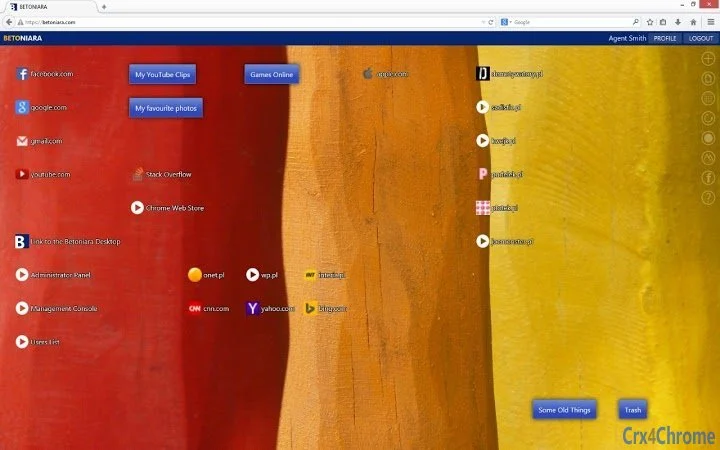
Description
Organize Your Web Links with Betoniara Desktop
Overview
Betoniara Desktop is a productivity-focused desktop application designed to help users manage and organize their favorite websites efficiently. The software addresses the common challenge of forgetting important web addresses by providing a centralized, customizable space to store and access links. It is particularly useful for individuals who frequently browse the web and rely on multiple resources across different domains, such as research, content creation, or entertainment.
Target users include students, professionals, and casual internet users who want a simple, visual way to keep track of valuable online content. The app allows users to store an unlimited number of links, rename them with custom labels, and assign personalized icons for quick identification. Links can be grouped into folders—referred to as subdesktops—enabling users to categorize content by topic, such as “Work Resources,” “YouTube Clips,” or “News Sites.”
Real-world usage scenarios include organizing educational materials, saving project-related tools, or curating entertainment content. The app also includes a light-hearted feature: the Betobu Game, which offers a brief distraction for users taking a break. While the developer, Betoniara, did not provide additional background details, the software’s focus on simplicity and user control suggests a user-first design philosophy.
Key Features & Capabilities
- Unlimited Link Storage – Users can save as many web links as needed without restrictions, making it ideal for long-term content curation.
- Customizable Labels and Icons – Each link can be renamed and assigned a unique icon, improving visual recognition and organization.
- Folder System (Subdesktops) – Links can be grouped into folders for better categorization, allowing users to create structured collections like “My YouTube Clips” or “Research Tools.”
- Drag-and-Drop Arrangement – Desktop icons can be repositioned easily using intuitive drag-and-drop functionality, enabling flexible workspace layout.
- Betobu Game Integration – A playful mini-game is included for users who want a short break, enhancing the app’s usability beyond pure productivity.
These features support efficient workflow management by reducing time spent searching for saved websites. For example, a content creator can group all video editing tools, reference sites, and tutorial links into a single folder. A student might organize lecture recordings, academic databases, and study guides under distinct subdesktops. The drag-and-drop interface ensures that the layout can be adjusted to match individual preferences, promoting a personalized digital workspace.
User Interface, Workflow & Performance
The user interface of Betoniara Desktop is designed around a clean, desktop-like layout that mimics familiar operating system environments. Navigation is straightforward, with links and folders displayed as icons on a virtual desktop surface. The interface supports intuitive interaction through mouse-based actions, allowing users to add, edit, or rearrange items with minimal learning curve.
Workflow efficiency is enhanced by the ability to quickly access stored links with a single click. The drag-and-drop functionality enables users to reorganize their desktop layout in real time, supporting dynamic workspace management. The inclusion of a game feature adds a layer of user engagement, offering a brief mental break during long work sessions.
Performance details were not specified by the developer. However, based on the software’s file size of 12.3 MB and its lightweight nature as a desktop utility, it is expected to operate smoothly on modern systems. The developer did not provide information on CPU or RAM usage, nor did they detail stability under prolonged use. General software behavior patterns suggest efficient resource handling, but specific performance data remains unavailable.
Compatibility & System Requirements
Betoniara Desktop is compatible with both Windows and Mac operating systems, making it accessible to a broad user base. The software version is 1.0.0, with a download size of 12.3 MB, indicating a compact and lightweight application. This small footprint suggests minimal impact on system resources and quick installation times.
Exact system requirements were not listed. The developer did not specify minimum hardware specifications such as RAM, processor speed, or disk space beyond the file size. Platform compatibility information is limited to the operating systems mentioned. Users are advised to ensure their system meets standard desktop application requirements for optimal performance. No additional dependencies or third-party tools were noted.
Pros and Cons
Pros
- Free to download and use with no hidden costs
- Supports unlimited links and customizable labels/icons
- Intuitive drag-and-drop interface for easy organization
- Folder system enables structured content grouping
- Lightweight at only 12.3 MB
- Includes a fun distraction feature with the Betobu Game
Cons
- No detailed system requirements provided
- Performance metrics such as CPU/RAM usage were not disclosed
- Limited information on update frequency or future development plans
- Offline functionality not explicitly confirmed
- No integration with cloud sync or cross-device access
FAQ Section
Is Betoniara Desktop available for both Windows and Mac?
Yes, the software is compatible with both Windows and Mac operating systems as stated in the product details.
Is the software free to use?
Yes, Betoniara Desktop is available at no cost. There are no subscription fees or in-app purchases mentioned.
Can I sync my links across multiple devices?
There is no information provided about cloud sync or cross-device access. The software may only function on a single device.
Does Betoniara Desktop require an internet connection?
The app’s core functionality—storing and accessing links—can operate offline. However, the game feature may require connectivity for certain functions.
How often are updates released?
Update frequency was not specified. Users should check the official website for the latest version and release notes.
Final Thoughts + CTA
Betoniara Desktop delivers a simple yet effective solution for users seeking to organize their web links in a visually intuitive way. Its combination of unlimited storage, customizable labels, folder grouping, and drag-and-drop editing makes it a valuable tool for managing digital resources. The inclusion of the Betobu Game adds a unique touch, offering a moment of fun during breaks.
While detailed system requirements and performance data are missing, the app’s small size and straightforward design suggest reliable operation on most modern systems. It is especially well-suited for students, researchers, and professionals who rely on consistent access to multiple websites. For those looking for a free, lightweight, and user-friendly way to manage bookmarks, Betoniara Desktop stands out as a practical choice.
Download Betoniara Desktop now
Guides & Tutorials for Betoniara Desktop App for Chrome
How to install Betoniara Desktop App for Chrome
- Click the Preview / Download button above.
- Once redirected, accept the terms and click Install.
- Wait for the Betoniara Desktop App for Chrome download to finish on your device.
How to use Betoniara Desktop App for Chrome
This software is primarily used for its core features described above. Open the app after installation to explore its capabilities.
User Reviews for Betoniara Desktop App for Chrome 0
No reviews found





